- Traditional workers’ comp is billed on an estimate, then corrected by an audit after the policy year.
- Pay-as-you-go bills your premium with each payroll, based on actual wages.
- Result: little or no upfront deposit, payments that follow your real staffing, and far fewer audit surprises.
- It’s the same coverage. Only the billing changes.
Let’s talk about one of the most annoying bills in small business: the workers’ comp audit.
Here’s how it usually goes. At the start of your policy year, your insurer asks you to estimate your payroll for the next twelve months. You make a reasonable guess. They charge a premium based on that guess, often with a chunky deposit upfront. Then the year happens. You hire more people than planned because business is good. And a few months after the policy ends, the auditor shows up, counts your actual payroll, and sends you a bill for the difference.
Growing turned into a penalty. That’s backwards.
Pay-as-you-go workers’ comp exists to fix exactly this, and a lot of owners have never been told it’s an option.
A quick refresher: what workers’ comp is
Workers’ compensation insurance covers medical costs and lost wages when an employee is hurt on the job, and generally protects the employer from being sued over it. Almost every state requires employers to carry it once they have employees, though the exact rules (and exemptions for very small employers) vary by state and industry. A few states run their own state funds with their own payment rules.
The premium is based on two main things: how much you pay in wages, and how risky the work is. Every job is assigned a classification code with its own rate. A roofer’s rate is much higher than an office manager’s.
Traditional vs. pay-as-you-go, side by side
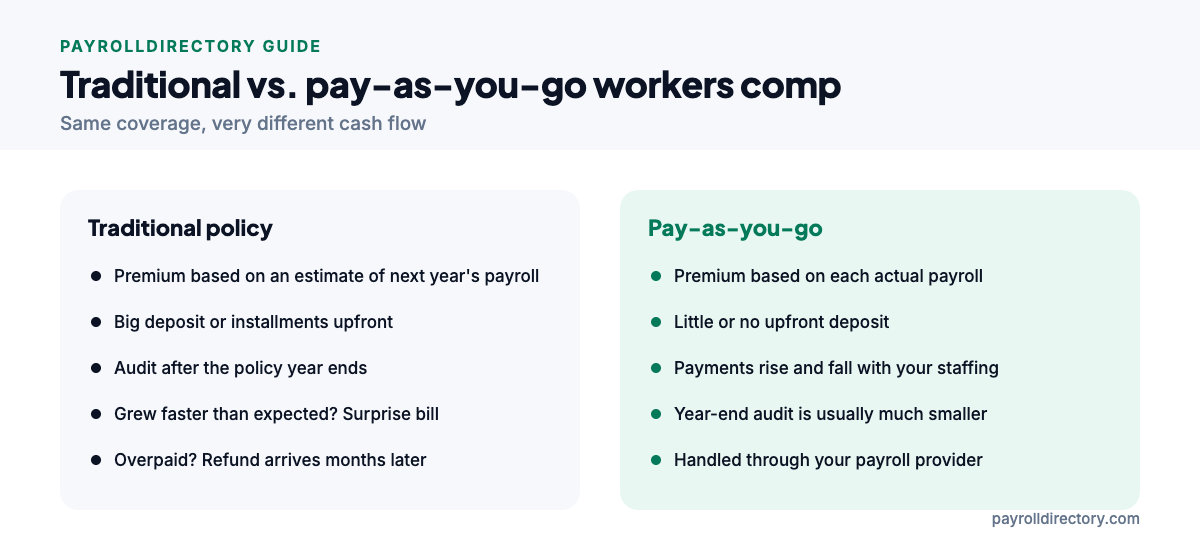
The traditional way
Premium is calculated on estimated annual payroll. You pay a deposit or installments based on that estimate. After the policy year, an audit compares the estimate with reality:
- Paid more wages than you estimated? You owe additional premium, sometimes a lot.
- Paid less? You get a refund, but your cash was tied up for a year.
The pay-as-you-go way
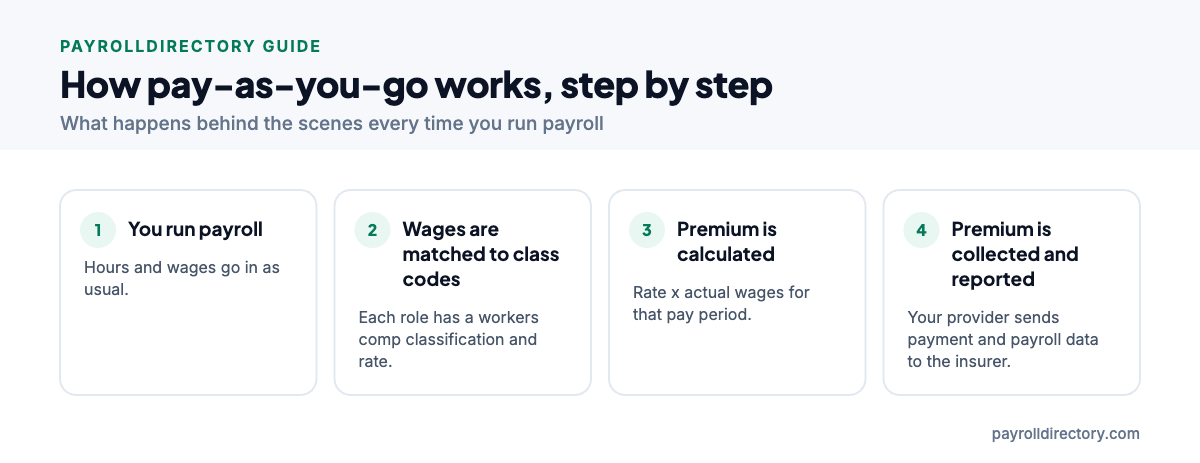
Premium is calculated on actual wages, every time you run payroll. Your payroll provider sends the wage data to the insurer, and the premium for that pay period is collected along with it.
A simple example
Let’s use round, made-up numbers to see the difference. Say your classification rate works out to $2 per $100 of payroll, and you expect $400,000 of payroll this year.
Traditional: your estimated premium is $8,000. The insurer asks for a deposit upfront, maybe 25% ($2,000), then installments. But you have a great year and actual payroll comes in at $500,000. After the audit, you owe another $2,000 on top of everything you already paid.
Pay-as-you-go: you pay $2 for every $100 of wages as you go. In slow months you pay less. In busy months you pay more. By year-end you’ve paid $10,000, the same total cost for the same coverage, but it followed your actual business instead of arriving as a lump-sum surprise.
The coverage cost didn’t change. The timing did. And for a small business, timing is often everything.
Who benefits most
- Seasonal businesses: landscaping, pool services, hospitality, tax prep, retail. Payroll swings wildly, so estimates are always wrong.
- Fast-growing businesses: if you’re hiring quickly, traditional audits almost guarantee a bill.
- New businesses: keeping cash in the bank in year one matters more than almost anything.
- Anyone who’s been burned by an audit before. You know who you are.
What to check before you switch
- Classification codes. Make sure every role is coded correctly. Pay-as-you-go doesn’t fix misclassified roles, and a final audit can still adjust them.
- The insurer and the policy. Pay-as-you-go is a billing method, not a different kind of coverage. Confirm who the insurer is, your limits and how claims work.
- Fees. Ask whether your payroll provider charges anything for the integration.
- Your state. Rules vary, and a few states run monopolistic state funds with their own systems.
Pay-as-you-go vs. a PEO
A PEO usually includes workers’ comp under its own master policy, so coverage and billing are bundled with payroll automatically. Pay-as-you-go through a payroll bureau gives you similar cash flow benefits while you keep your own policy and your own broker. If you’re weighing the two, my bureau vs. CPA vs. PEO guide helps.
How to set it up
- Ask your payroll provider whether they offer pay-as-you-go workers’ comp and which insurers they work with. Many payroll providers in the directory offer it.
- Check your current policy dates. The cleanest switch is usually at renewal, but some insurers allow a mid-term change.
- Review your class codes with the agent so each role is coded correctly from day one.
- Confirm how payroll data flows to the insurer and when premiums are collected, so you can plan cash flow around it.
Once it’s running, there’s nothing extra to do. Premiums just show up alongside each payroll, sized to what you actually paid.
Frequently asked questions
Is pay-as-you-go workers’ comp more expensive?
The premium is based on the same rates and your actual payroll, so the coverage cost is generally the same. You may see a small service fee from your payroll provider, so ask.
Do I still get audited?
Usually there’s still a year-end review, but because premiums were based on real wages all year, adjustments tend to be small.
Can I switch mid-policy?
Sometimes. It depends on your insurer and state. Your payroll provider or insurance agent can tell you whether you can switch now or at renewal.
Find payroll providers that offer pay-as-you-go workers’ comp
Ready to find your payroll partner?
Compare 2,500+ independent payroll bureaus, CPA firms and PEOs across all 50 states and DC, then contact them directly. No middleman, no fees.