- The easiest time to switch is January 1. The next best is the start of a quarter.
- Switching mid-quarter works, but your new provider must load year-to-date history for every employee.
- Run one parallel payroll before going live. It catches almost every setup error.
- Agree in writing who files what for the final quarter so nothing is filed twice or not at all.
Plenty of business owners aren’t happy with their payroll provider. The fees keep creeping up, support takes days, or they’ve simply outgrown it. And yet they stay. Why? Because switching sounds terrifying. What if someone doesn’t get paid? What if taxes get filed twice? What if the W-2s are wrong?
Here’s the reassuring truth: payroll providers onboard new clients from other providers all the time. It’s a routine process with a well-worn checklist. If you give it about a month and follow the steps, your employees won’t notice anything except maybe a nicer pay stub.
Timing: when should you switch?
The best time is January 1. Your new provider starts with a clean slate: zero year-to-date totals, a fresh set of quarterly returns, and no need to stitch together W-2 data from two systems.
The next best time is the start of a quarter: January, April, July or October. That lines up with quarterly Form 941 filings, so each provider files complete quarters.
Mid-quarter is absolutely possible, it just takes more care. Your new provider has to load each employee’s year-to-date wages and taxes so that things like the Social Security wage cap ($184,500 for 2026), quarterly returns and year-end W-2s come out right. Ask the new provider how often they do mid-year conversions. Good ones do them constantly.
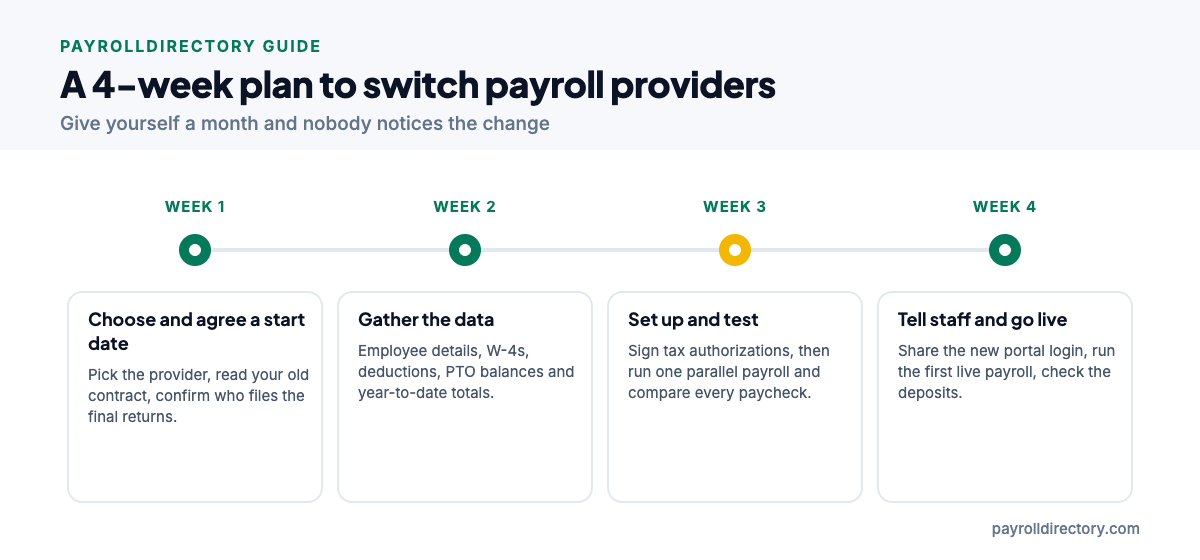
The 4-week plan, step by step
Week 1: Choose your provider and read your current contract
Use my 12-question checklist to pick a provider, then agree on a first payroll date at least two to four weeks out.
Then dig out your current contract. Look for three things: the notice period, any cancellation fees, and what your old provider will still file for you. Typically the old provider files returns for the periods it processed. Get that agreed in writing so nothing falls between the cracks.
Week 2: Gather the data
Your new provider will send a list, but here’s what to expect so you can start early:
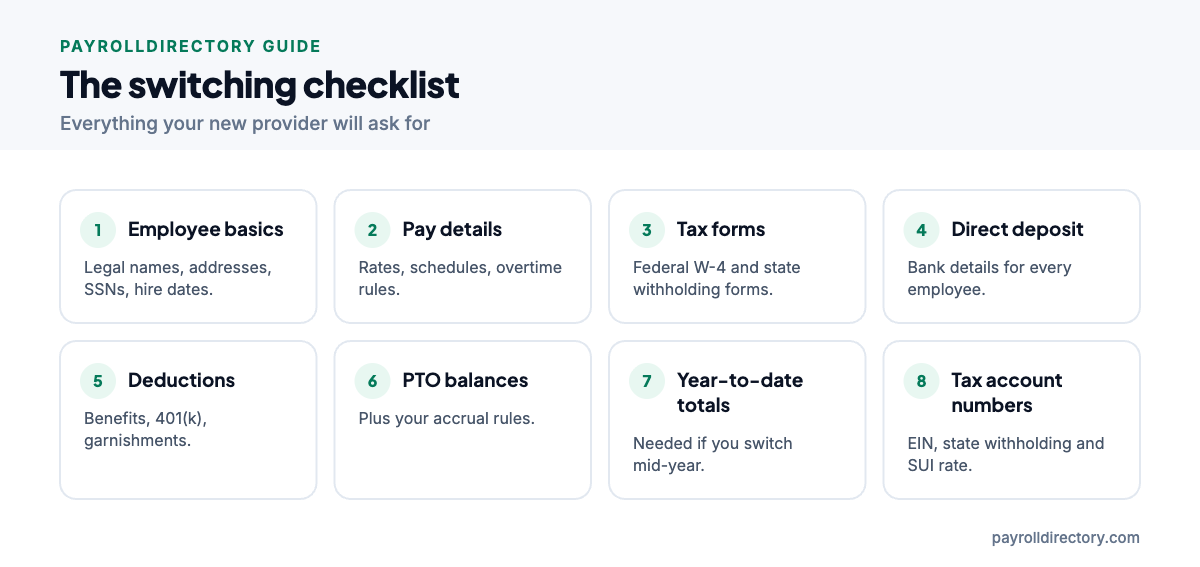
Most of this you can export from your current payroll system as reports: an employee census, a deduction register, a year-to-date payroll register and recent tax filings. Download everything while you still have access. Once an account closes, getting reports out can be painful.
Week 3: Set up tax accounts and run a parallel payroll
Your federal EIN and state account numbers don’t change when you switch providers. The new provider just needs them, along with your state unemployment (SUI) tax rate, plus your signature on authorization forms so they can file and pay for you. At the federal level, that’s usually IRS Form 8655, the reporting agent authorization.
Now the step I’d never skip: the parallel payroll. Ask the new provider to calculate one payroll at the same time as your current provider runs it for real. Then compare net pay for every single employee.
Any differences? Investigate them now. A $3 difference usually means a wrong state withholding setting, a missing deduction or a W-4 that was entered slightly differently. Finding it in a test costs nothing. Finding it after a live payroll means corrections, apologies and possibly amended returns.
Week 4: Tell your team and go live
Send a short note to employees: what’s changing, when their first paycheck from the new system arrives, and how to log in to the new portal. Reassure them that their payday isn’t changing (assuming it isn’t). A two-paragraph email prevents a lot of anxious questions.
Run your first live payroll. Then check three things: everyone got paid the right amount, tax deposits went out on time, and totals match what you expected.
The mistakes that cause trouble
- Forgetting year-to-date history. This is the big one for mid-year switches. Without it, high earners can have too much Social Security withheld, and W-2s won’t match.
- Double or missing quarterly filings. Agree exactly who files the Form 941 for the switchover quarter.
- Benefit deductions that don’t make it over. That can cause gaps in health coverage or missed 401(k) contributions.
- Switching right before a big payroll. Avoid going live on the payroll with year-end bonuses or right before a holiday.
- Losing access to old reports. Export everything before your old account closes.
Is it worth the hassle?
If your current setup is costing you time, money or sleep, almost always yes. A month of focused work buys you years of better service. And here’s a bonus: switching forces you to clean up your payroll data, which tends to surface little problems that were quietly costing you.
What to say to your old provider
This conversation is less awkward than people expect. Keep it short and practical. Something like:
“We’ve decided to move our payroll to another provider. Our last payroll with you will be on [date]. Please confirm the notice you need, any final fees, and which quarterly and year-end returns you’ll file for the periods you processed. We’d also like exports of our employee census, deduction setup, year-to-date payroll register and tax filings before the account closes.”
That one message covers the four things that matter: the timeline, the cost, who files what, and your data. Ask for their answers in writing. If they offer a discount to stay, it’s fine to listen, but remember why you started looking.
Frequently asked questions
Will my employees’ W-2s be split between two providers?
If you switch mid-year, ideally no. Your new provider loads year-to-date totals and issues one combined W-2 per employee. Confirm this with them before you switch.
Do I need a new EIN or new state tax accounts?
No. Your tax accounts belong to your business, not your provider. The exception is moving into or out of a PEO, which may change which tax ID wages are reported under.
How long does switching payroll providers take?
Plan for two to four weeks from signing to first live payroll. Simple setups can be faster; multi-state or complex payrolls can take longer.
Ready to find your payroll partner?
Compare 2,500+ independent payroll bureaus, CPA firms and PEOs across all 50 states and DC, then contact them directly. No middleman, no fees.